
Setting up your cloud office is only half the battle. Without intentional habits, a digital workspace can quickly devolve into a chaotic digital junkyard. Files go missing, sensitive information gets over-shared, and communication gaps slow down daily operations. This article will cover some Google Workspace best practices for business.
Implementing Google Workspace best practices for business protects your company data and keeps your team aligned. Let’s look at how to build an efficient operational structure—and the critical mistakes you need to avoid along the way.
Core Pillars of Google Workspace Best Practices
1. Organizing Drive with Intention
A disorganized cloud storage system forces employees to waste hours searching for templates, assets, and data.
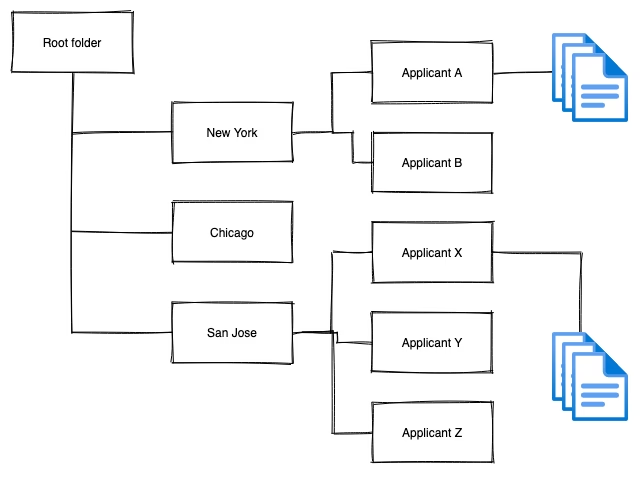
- Standardize Naming Conventions: Adopt a universal naming format across the entire company. For example:
[Project Name] - [Document Type] - [YYYYMMDD]. This ensures the search bar works effectively for everyone. - The Root Rule: Keep your root folders clean. Use a standardized, top-down folder hierarchy based on departments, clients, or specific functions rather than letting loose files clutter the main directory.
2. Managing Permissions and Security
Data leaks often happen internally due to careless file sharing.
- The Principle of Least Privilege: Only grant employees the exact level of access they need to complete their tasks. If someone just needs to read a report, mark them as a Viewer or Commenter, never an Editor.
- Use Link Expirations: When sharing sensitive assets with external clients or contractors, use Google’s advanced sharing settings to set an expiration date for their access.
3. Clear Communication Guidelines
Google Workspace provides multiple ways to talk to your team. Establish internal rules on which tool to use and when:
- Google Chat: Best for quick questions, fast updates, and casual check-ins.
- Gmail: Reserved for formal decisions, external client communication, and updates that require a permanent paper trail.
- Google Meet: Ideal for complex problem-solving, brainstorming, or performance reviews that require nuance.
4. Continuous Workflow Tips
- Actionable Tagging: Use
@mentionsin Docs, Sheets, and Slides to assign clear tasks. Checking the “Assign to” box turns a comment into an accountable task that triggers an email alert and tracks completion. - Inbox Priority Matrix: Utilize Gmail’s “Priority Inbox” or custom labels to separate internal team messages, client requests, and automated notifications automatically.
4 Costly Mistakes to Avoid
To successfully deploy Google Workspace best practices for business, you need to be aware of the habits that derail workplace productivity.
| Mistake | Why It Hurts Your Business | The Solution |
| Poor File Organization | Creates massive search friction and leads to duplicate work when teams can’t find master files. | Enforce standardized naming conventions and run quarterly folder audits. |
| Over-Permissioning | Exposes confidential payroll, legal, or strategy documents to the wrong personnel or public web. | Audit external access links regularly. Rely on security groups rather than individually sharing files. |
| Lack of Communication Structure | Causes critical project data to get buried in informal chat channels instead of structured docs. | Mandate a clear rulebook for when to use Chat vs. Docs or Gmail. |
| Not Using Shared Drives | Files created in “My Drive” belong to the individual creator. If that employee leaves, their files can vanish. | Adopt Shared Drives for all company-wide and departmental data. |
The Big Takeaway: Individual “My Drive” spaces should only be used for personal drafts or temporary scratchpads. Any document that impacts the company’s daily operations must live inside a departmentally managed Shared Drive to protect your business’s operational continuity.
Wrapping Up
Applying these Google Workspace best practices for business transforms a basic set of software tools into a highly secure, frictionless environment. By enforcing strict file organization, clamping down on broad sharing links, and committing fully to corporate Shared Drives, you protect your data assets while empowering your team to move at lightning speed.
For more tips about how to use Google Workspace properly for your business, check out our other articles.